
Outbox
Introduction
Section titled “Introduction”MassTransit supports two outbox approaches depending on your durability and delivery guarantees. The In-Memory Outbox buffers messages in process until a consumer completes, while the Transactional Outbox persists messages in a database so they can be delivered later, even if the process restarts. Use the in-memory option for maximum throughput when retries are enough, and the transactional option when you need stronger durability and exactly-once consumer behavior.
The Transactional Outbox also includes a Bus Outbox, which can be used to buffer messages published or sent outside a consumer.
In-Memory Outbox
Section titled “In-Memory Outbox”This post details the In-Memory Outbox, including what it does, how to configure it, and how it ensures eventual consistency in the presence of database or message transport failures.
MassTransit implements messaging patterns, many of which are designed to ease the transition from a tightly-coupled, database-centric application to a set of services that are highly available, reliable, and eventually consistent. Some of these patterns are obvious, but some of them require a little more explanation to truly understand how they are best utilized.
Commands
Section titled “Commands”Commands are used to do things, like update a database record. Updating a database record usually includes publishing events to notify services that a change in state has occurred.
In a transactional mindset, updating the database and publishing the event is expected to be performed as a single atomic operation. In distributed systems, performing a distributed transaction between the database and the message broker is unrealistic.
In MassTransit, sagas are message handlers that maintain state. An initial message creates a saga instance and subsequent messages may correlate to the same instance. Between messages, the saga instance state is persisted using a database. While consuming a message, a saga may send commands and/or publish events.
The message flow for a saga includes:
- On message receipt, an existing saga instance is loaded from the database. If a matching instance does not exist, a new instance is created.
- The message is delivered to the saga instance.
- Once the message is handled, the saga instance is saved or updated in the database.
Step 2 is where the magic happens. The state can be changed, messages can be sent and published, anything.
So, what’s the problem? A few things.
Failures
Section titled “Failures”An obvious problem is a database failure saving the saga instance. If messages were already sent or published, and the instance was not saved, other services would receive those messages yet the database has not been updated.
A race condition is another concern, since the events may be consumed before the database update is complete. Yes, message brokers are fast, and many times messages are already being consumed long before (in computer time) the database update is started.
So, retry?
Section titled “So, retry?”Retrying operations is a key trait of a resilient system. Transient failures happen, even more so in distributed systems, so it makes sense to retry failures in the presence of failures. Of course, not all failures are transient. For instance, trying to take out the trash when it has already been taken out isn’t possible (well, until tomorrow).
In this example, designing idempotent services such that duplicate commands do not result in duplicate operations would be the best solution. But that’s another topic worth studying.
If retrying the database failure isn’t enough, it may make sense to retry the entire message processing sequence – starting at step 1. In this case, the saga instance is discarded, and the message is retried from the beginning. The saga instance is loaded (or created), the message is delivered, and the instance is saved. This is repeated until it is successful or until the retry policy expires and the message is moved to the _error queue.
Because it’s bad. Study poison message handling.
A new retry-related issue is duplicate messages. Messages may be sent or published multiple times – once for each attempt. This can create non-deterministic behavior in services that consume those messages. Therefore, a method to delay messages from being sent until the saga instance is saved is needed.
The Outbox
Section titled “The Outbox”The outbox holds messages and delivers them after the transactional portion of the message processing has completed. With a saga, the messages are delivered after the saga instance is saved successfully. This ensures that the database is updated before any consumers can start processing any of the produced messages.
The In-Memory Outbox
Section titled “The In-Memory Outbox”The In-Memory Outbox, a feature included with MassTransit, holds published and sent messages in memory until the message is processed successfully (such as the saga being saved to the database). Once the received message has been processed, the message is delivered to the broker and the received message is acknowledged as successful.
MassTransit consumes messages in acknowledgement mode. The broker locks the message and the message is invisible to other consumers until it is either acknowledged (ack’d) by the consumer or negatively-acknowledged (n’ack’d) explictly by the consumer or implicitly due to a service or network failure.
The full configuration is in the documentation, a simple example is shown below.
cfg.ReceiveEndpoint("r-trashy-saga", e =>{    e.UseInMemoryOutbox();
    e.StateMachineSaga<TrashStateMachine, TrashState>(machine, repository);});
In the example above, retry and redelivery was left out on purpose. The broker will redeliver the message if the process crashes or the network splits. For production services, retry filters should be added to handle transient database errors and ignore failures caused by business constraint violations.
But what if the message doesn’t send?
Section titled “But what if the message doesn’t send?”This question comes up, and it is a fair question. If the broker goes down, the outbox would be unable to deliver the messages. If the process crashes, the messages in the outbox would be lost. Both of these failures can happen, though it is rare. And if computer science has one rule, it is that the rare will always happen. In production. On a Friday afternoon.
Time to Take out the Trash
Section titled “Time to Take out the Trash”Imagine you’re twelve, sitting on the sofa, playing video games with your friends. Suddenly, from the other room, you hear your mom call out, “Take out the trash!” Of course, you’re in the middle of a battle, and while you’ve explained many times that you can’t pause a multiplayer game, mom just doesn’t get it. So you do what any 12-year-old does, you ignore her. The trash remains right where it is, in the kitchen.
After a while, the lack of a door opening and closing, the still present smell of burnt popcorn from the kitchen, and your mom calls out again, “Take out the trash.” At this point, you’re dead, in spectator mode, and decide to comply – you take out the trash. Then you slide back onto the sofa and get ready for round two.
More time passes, the squad is ready and you’re about to get on the bus. Your mom, however, didn’t hear from you and shouts once more, “I said take out the trash.” “Mom, I already took it out” you reply, realizing after that you forgot to mute your mic. The jests and jokes commence as you thank the bus driver and head out.
The Story
Section titled “The Story”This real-world example includes both failures scenarios that are brought up when considering the in-memory outbox.
First, it didn’t happen. The database may have been unavailable or the service crashed deserializing the message. Either way, it failed. And the message? It’s still on the broker. It will be redelivered. Mom will keep telling you to take out the trash until you take it out.
Second, it happened but the messages were not delivered. You didn’t tell her you took it out. In this case, the message will also be retried. But in this case, this rare case, this is where the previously mentioned term idempotence comes back onto the field.
When the message is attempted a third time (and face it, the third time is dangerously close to getting a chancla to the head), the database was already updated. The invoice is already approved, in the database. The messages weren’t sent, however, so other services may not know that the invoice was approved. In this case, for the service to be idempotent, it should assume that:
- The message delivery failed because it is being delivered – again.
- Since the invoice is approved, and this is the approve invoice command, something must have failed after the database was updated.
- The only thing after the database update is the outbox delivering messages.
Study Occam’s Razer (okay, yeah, I’m a fan of Razer gaming gear so I’m leaving it spelled that way)
The correct thing to do at this point is to use the state in the database, along with any information that is contained in the message, to produce the same commands and events that were produced in the previous attempt. Those messages will be delivered by the outbox, and the message will be acknowledged.
!! Victory !!
Section titled “!! Victory !!”That’s it, an easy-to-use, reliable solution to perform atomic operations that update a database and send/publish messages, and it works for any database updates that are sent as commands (delivered by durable message queues).
And a big thank you to Jimmy Bogard, who’s tweet prompted me to write this article!
Other Reading
Section titled “Other Reading”Transactional Outbox NServiceBus Outbox
Transactional Outbox
Section titled “Transactional Outbox”It is common that a service may need to combine database writes with publishing events and/or sending commands. And in this scenario, it is usually desirable to do this atomically in a transaction. However, message brokers typically do not participate in transactions. Even if a message broker did support transactions, it would require a two-phase commit (2PC) which should be avoided whenever possible.
While MassTransit has long provided an in-memory outbox, there has often been criticism that it isn’t a real outbox. And while I have proven that it works, is reliable, and is extremely fast (broker message delivery speed), it does require care to ensure operations are idempotent and when an idempotent operation is detected, events are republished. The in-memory outbox also does not function as an inbox, so exactly-once message delivery is not supported.
The Transactional Outbox has two main components:
-
The Bus Outbox works within a container scope (such as the scope created for an ASP.NET Controller) and adds published and sent messages to the specified
DbContext. Once the changes are saved, the messages are available to the delivery service which delivers them to the broker. -
The Consumer Outbox is a combination of an inbox and an outbox. The inbox is used to keep track of received messages to guarantee exactly-once consumer behavior. The outbox is used to store published and sent messages until the consumer completes successfully. Once completed, the stored messages are delivered to the broker after which the received message is acknowledged. The Consumer Outbox works with all consumer types, including Consumers, Sagas, and Routing Slip Activities.
Either of these components can be used independently or both at the same time.
Bus Outbox Behavior
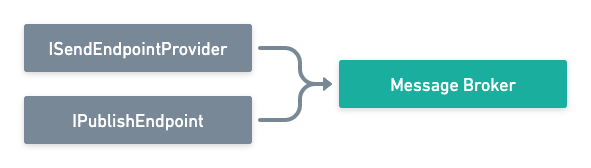
Section titled “Bus Outbox Behavior”Normally when messages are published or sent they are delivered directly to the message broker:
When the bus outbox is configured, the scoped interfaces are replaced with versions that write to the outbox. Since ISendEndpointProvider and
IPublishEndpoint are registered as scoped in the container, they are able to share the same scope as the DbContext used by the application.
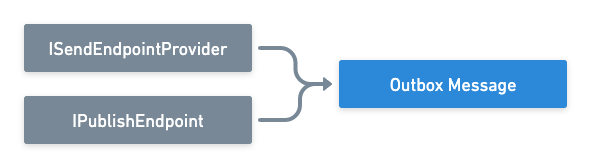
Once the changes are saved in the DbContext (typically by the application calling SaveChangesAsync), the messages will be written to the database as part of
the transaction and will be available to the delivery service.
The delivery service queries the OutboxMessage table for messages published or sent via the Bus Outbox, and attempts to deliver any messages found to the
message broker.
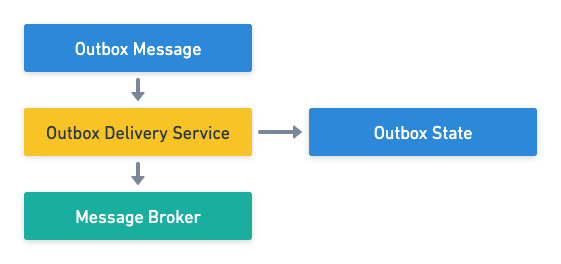
The delivery service uses the OutboxState table to ensure that messages are delivered to the broker in the order they were published/sent. The OutboxState table is also used to lock messages so that multiple instances of the delivery service can coexist without conflict.
Consumer Outbox Behavior
Section titled “Consumer Outbox Behavior”Normally, when messages are published or sent by a consumer or one of its dependencies they are delivered directly to the message broker:
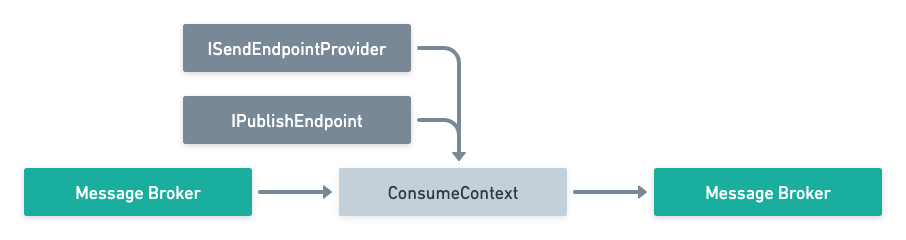
When the outbox is configured, the behavior changes. As a message is received, the inbox is used to lock the message by MessageId.

When the consumer publishes or sends a message, instead of being delivered to the broker it is stored in the OutboxMessage table.
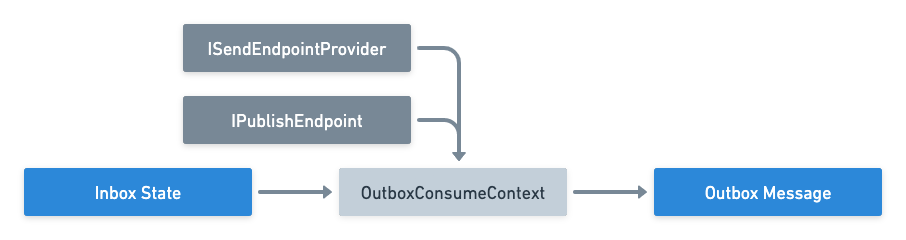
Once the consumer completes and the messages are saved to the outbox, those messages are delivered to the message broker in the order they were produced.
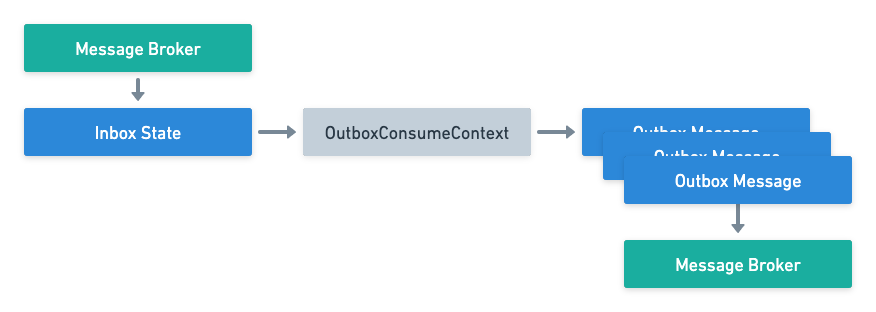
If there are issues delivering the messages to the broker, message retry will continue to attempt message delivery.
For details on configuring the transactional outbox, refer to the configuration section.