
RabbitMQ Configuration

With tens of thousands of users, RabbitMQ is one of the most popular open source message brokers. RabbitMQ is lightweight and can to deployed on premises and in the cloud. RabbitMQ can also be deployed in distributed and federated configurations to meet high-scale, high-availability requirements.
RabbitMQ provides features such as routing, reliable delivery, and message persistence. It also has a built-in management interface that allows for monitoring and management of the broker, queues, and connections. Additionally, it supports various plugins, such as the RabbitMQ Management Plugin, that provide additional functionality.
MassTransit fully supports RabbitMQ, including many of the advanced features and capabilities.
Configure RabbitMQ
Section titled “Configure RabbitMQ”The minimum configuration to get started with RabbitMQ is shown below. The host name is localhost, the virtual host is /, and the credentials are
guest:guest. In this example, no consumers are configured, so the bus will not receive any messages.
namespace RabbitMqConsoleListener;
using System.Threading.Tasks;using MassTransit;using Microsoft.Extensions.Hosting;
public static class Program{    public static async Task Main(string[] args)    {        await Host.CreateDefaultBuilder(args)            .ConfigureServices(services =>            {                services.AddMassTransit(x =>                {                    x.UsingRabbitMq((context, cfg) =>                    {                        cfg.Host("localhost", "/", h =>                        {                            h.Username("guest");                            h.Password("guest");                        });                    });                });            })            .Build()            .RunAsync();    }}
Sample configuration
Section titled “Sample configuration”The configuration includes:
- The RabbitMQ host
- Host name:
localhost - Virtual host:
/ - User name and password used to connect to the virtual host (credentials are virtual-host specific)
- Host name:
- The receive endpoint
- Queue name:
order-events-listener - Consumer:
OrderSubmittedEventConsumer- Message type:
OrderSystem.Events.OrderSubmitted
- Message type:
- Queue name:
| Name | Description |
|---|---|
| order-events-listener | Queue for the receive endpoint |
| order-events-listener | An exchange, bound to the queue, used to send messages |
| OrderSystem.Events:OrderSubmitted | An exchange, named by the message-type, bound to the order-events-listener exchange, used to publish messages |
When a message is sent, the endpoint address can be one of two values:
exchange:order-events-listener
Send the message to the order-events-listener exchange. If the exchange does not exist, it will be created. MassTransit translates topic: to exchange: when using RabbitMQ, so that topic: addresses can be resolved – since RabbitMQ is the only supported transport that doesn’t have topics.
queue:order-events-listener
Send the message to the order-events-listener exchange. If the exchange or queue does not exist, they will be created and the exchange will be bound to the queue.
With either address, RabbitMQ will route the message from the order-events-listener exchange to the order-events-listener queue.
When a message is published, the message is sent to the OrderSystem.Events:OrderSubmitted exchange. If the exchange does not exist, it will be created. RabbitMQ will route the message from the OrderSystem.Events:OrderSubmitted exchange to the order-events-listener exchange, and subsequently to the order-events-listener queue. If other receive endpoints connected to the same virtual host include consumers that consume the OrderSubmitted message, a copy of the message would be routed to each of those endpoints as well.
::alert{type="danger"}
When an event is published, MassTransit creates the necessary exchange for it, such as OrderSystem.Events:OrderSubmitted. However, if the listener hasn’t started the bus yet, there won’t be a queue bound to that exchange, and any messages published will be lost. Once the listener starts the bus for the first time, it creates and binds the queue to the exchange. From that point on, even if the bus is stopped, the queue will remain bound to the exchange, ensuring that new messages are not lost. ::
Durable exchanges and queues remain configured on the virtual host, so even if the bus is stopped messages will continue to be routed to the queue. When the bus is restarted, queued messages will be consumed.
RabbitMQ transport options
Section titled “RabbitMQ transport options”All RabbitMQ transport options can be configured using the .Host() method. The most commonly used settings can be configured via transport options.
services.AddOptions<RabbitMqTransportOptions>() .Configure(options => { // configure options manually, but usually bind them to a configuration section });| Property | Type | Description |
|---|---|---|
| Host | string | Network host name |
| Port | ushort | Network port |
| ManagementPort | ushort | Management API port |
| VHost | string | Virtual host name |
| User | string | Username |
| Pass | string | Password |
| UseSsl | bool | True to use SSL/TLS |
RabbitMQ host options
Section titled “RabbitMQ host options”MassTransit includes several RabbitMQ options that configure the behavior of the entire bus instance.
| Property | Description |
|---|---|
| PublisherConfirmation | MassTransit will wait until RabbitMQ confirms messages when publishing or sending messages (default: true) |
| Heartbeat | The heartbeat interval used by the RabbitMQ client to keep the connection alive |
| RequestedChannelMax | The maximum number of channels allowed on the connection |
| RequestedConnectionTimeout | The connection timeout |
| ContinuationTimeout | Sets the time the client will wait for the broker to response to RPC requests. Increase this value if you are experiencing timeouts from RabbitMQ due to a slow broker instance. |
UseCluster
Section titled “UseCluster”MassTransit can connect to a cluster of RabbitMQ virtual hosts and treat them as a single virtual host. To configure a cluster, call the UseCluster methods,
and add the cluster nodes, each of which becomes part of the virtual host identified by the host name. Each cluster node can specify either a host or a
host:port combination.
While this exists, it’s generally preferable to configure something like HAProxy in front of a RabbitMQ cluster, instead of using MassTransit’s built-in cluster configuration.
ConfigureBatchPublish
Section titled “ConfigureBatchPublish”MassTransit will briefly buffer messages before sending them to RabbitMQ to increase message throughput. While use of the default values is recommended, the batch options can be configured.
| Property | Default | Description |
|---|---|---|
| Enabled | false | Enable or disable batch sends to RabbitMQ |
| MessageLimit | 100 | Limit the number of messages per batch |
| SizeLimit | 64K | A rough limit of the total message size |
| Timeout | 1ms | The time to wait for additional messages before sending |
x.UsingRabbitMq((context, cfg) =>{ cfg.Host("localhost", h => { h.ConfigureBatchPublish(x => { x.Enabled = true; x.Timeout = TimeSpan.FromMilliseconds(2); }); });});Receive Endpoint Configuration
Section titled “Receive Endpoint Configuration”MassTransit includes several receive endpoint level configuration options that control receive endpoint behavior.
| Property | Description |
|---|---|
| PrefetchCount | The number of unacknowledged messages that can be processed concurrently (default based on CPU count) |
| PurgeOnStartup | Removes all messages from the queue when the bus is started (default: false) |
| AutoDelete | If true, the queue will be automatically deleted when the bus is stopped (default: false) |
| Durable | If true, messages are persisted to disk before being acknowledged (default: true) |
Quorum Queues
Section titled “Quorum Queues”Quorum queues are a more reliable, replicated queue type supported by RabbitMQ. To specify the use of quorum queues, MassTransit can be configured at the individual receive endpoint level or globally using a configure endpoints callback.
To configure a receive endpoint to use a quorum queue:
x.UsingRabbitMq((context, cfg) =>{ cfg.ReceiveEndpoint("queue-name", e => { e.SetQuorumQueue(3); // replication factor of 3 });});To configure all receive endpoints using a configure endpoints callback:
services.AddMassTransit(x =>{ x.AddConfigureEndpointsCallback((name, cfg) => { if (cfg is IRabbitMqReceiveEndpointConfigurator rmq) rmq.SetQuorumQueue(3); });});Reply To Request Client
Section titled “Reply To Request Client”New in MassTransit v8.3.0
RabbitMQ provides a default ReplyTo address for every broker connection that can be used to send messages directly to the connection without the need to create a temporary queue. MassTransit supports use of the ReplyTo address for the request client.
::alert{type="info"}
By default, MassTransit will create a non-durable, auto-delete queue for the bus and use that queue for responses sent to the request client. ::
To configure MassTransit to use the ReplyTo address instead of the bus endpoint:
services.AddMassTransit(x =>{    x.SetRabbitMqReplyToRequestClientFactory();
    x.UsingRabbitMq((context, cfg) =>    {        cfg.ConfigureEndpoints(context);    });});
This will replace the default request client factory with the RabbitMQ-specific ReplyTo client factory, allowing responses to requests sent using the request client to be delivered using the broker connection’s ReplyTo address.
Configure CloudAMQP
Section titled “Configure CloudAMQP”MassTransit can be used with CloudAMQP, which is a great SaaS-based solution to host your RabbitMQ broker. To configure MassTransit, the host and virtual host must be specified, and UseSsl must be configured.
services.AddMassTransit(x =>{    x.UsingRabbitMq((context, cfg) =>    {        cfg.Host("wombat.rmq.cloudamqp.com", 5671, "your_vhost", h =>        {            h.Username("your_vhost");            h.Password("your_password");
            h.UseSsl(s =>            {                s.Protocol = SslProtocols.Tls12;            });        });    });});
Configure AmazonMQ - RabbitMQ
Section titled “Configure AmazonMQ - RabbitMQ”AmazonMQ now includes RabbitMQ support, which means the best message broker can now be used easily on AWS. To configure MassTransit, the AMQPS endpoint address can be used to configure the host as shown below.
services.AddMassTransit(x =>{ x.UsingRabbitMq((context, cfg) => { cfg.Host(new Uri("amqps://b-12345678-1234-1234-1234-123456789012.mq.us-east-2.amazonaws.com:5671"), h => { h.Username("username"); h.Password("password"); }); });});Configure the broker topology
Section titled “Configure the broker topology”With RabbitMQ, which supports exchanges and queues, messages are sent or published to exchanges and RabbitMQ routes those messages through exchanges to the appropriate queues.
The send and publish topologies are extended to support RabbitMQ features and make it possible to configure how exchanges are created.
When the bus is started, MassTransit will create exchanges and queues on the virtual host for the receive endpoint. MassTransit creates durable, fanout exchanges by default, and queues are also durable by default.
Exchanges
Section titled “Exchanges”In RabbitMQ, an exchange is a component that receives messages from producers and routes them to one or more queues based on a set of rules called bindings. Exchanges are used to decouple the producer of a message from the consumer, by allowing messages to be sent to multiple queues and/or consumers.
There are several types of exchanges in RabbitMQ, each with its own routing algorithm:
| Exchange Type | Routing Algorithm |
|---|---|
| Direct exchange | route messages to queues based on an exact match of the routing key |
| Fanout exchange | route messages to all bound queues |
| Topic exchange | route messages to queues based on a pattern match of the routing key |
| Headers exchange | route messages to queues based on the headers of the message |
When a message is published to an exchange, the exchange applies the routing algorithm based on the routing key and the bindings to determine which queues the message should be sent to. The message is then sent to each of the queues that it matches.
Exchanges allow for more complex routing and message distribution strategies, as they allow to route messages based on different criteria, such as routing key, headers, or patterns.
When a message is published, MassTransit sends it to an exchange that is named based upon the message type. Using topology, the exchange name, as well as the exchange properties can be configured to support a custom behavior.
To configure the properties used when an exchange is created, the publish topology can be configured during bus creation:
cfg.Publish<OrderSubmitted>(x =>{    x.Durable = false; // default: true    x.AutoDelete = true; // default: false    x.ExchangeType = "fanout"; // default, allows any valid exchange type});
cfg.Publish<OrderEvent>(x =>{    x.Exclude = true; // do not create an exchange for this type});
Exchange Binding
Section titled “Exchange Binding”To bind an exchange to a receive endpoint:
cfg.ReceiveEndpoint("input-queue", e =>{ e.Bind("exchange-name"); e.Bind<MessageType>();})The above will create two exchange bindings, one between the exchange-name exchange and the input-queue exchange and a second between the exchange name
matching the MessageType and the same input-queue exchange.
The properties of the exchange binding may also be configured:
cfg.ReceiveEndpoint("input-queue", e =>{ e.Bind("exchange-name", x => { x.Durable = false; x.AutoDelete = true; x.ExchangeType = "direct"; x.RoutingKey = "8675309"; });})The above will create an exchange binding between the exchange-name and the input-queue exchange, using the configured properties.
RoutingKey
Section titled “RoutingKey”The routing key on published/sent messages can be configured by convention, allowing the same method to be used for messages which implement a common interface type. If no common type is shared, each message type may be configured individually using various conventional selectors. Alternatively, developers may create their own convention to fit their needs.
When configuring a bus, the send topology can be used to specify a routing key formatter for a particular message type.
public record SubmitOrder{ public string CustomerType { get; init; } public Guid TransactionId { get; init; } // ...}cfg.Send<SubmitOrder>(x =>{ // use customerType for the routing key x.UseRoutingKeyFormatter(context => context.Message.CustomerType);
// multiple conventions can be set, in this case also CorrelationId x.UseCorrelationId(context => context.Message.TransactionId);});
// Keeping in mind that the default exchange config for your published type will be the full typename of your message// we explicitly specify which exchange the message will be published to. So it lines up with the exchange we are binding our// consumers too.cfg.Message<SubmitOrder>(x => x.SetEntityName("submitorder"));
// Also if your publishing your message: because publishing a message will, by default, send it to a fanout queue.// We specify that we are sending it to a direct queue instead. In order for the routingkeys to take effect.cfg.Publish<SubmitOrder>(x => x.ExchangeType = ExchangeType.Direct);Global Topology
Section titled “Global Topology”To configure transport-specific topology conventions at a global level using GlobalTopology, the appropriate conventions must be added. For example, to
globally configure a RoutingKey formatter for a base interface on a message contract:
GlobalTopology.Send.TryAddConvention(new RoutingKeySendTopologyConvention());
GlobalTopology.Send.UseRoutingKeyFormatter<ICanHasRoutingKey>(x => x.Message.RoutingKey.ToString());
The consumer could then be created:
public class OrderConsumer :    IConsumer<SubmitOrder>{    public async Task Consume(ConsumeContext<SubmitOrder> context)    {
    }}
And then connected to a receive endpoint:
cfg.ReceiveEndpoint("priority-orders", x =>{    x.ConfigureConsumeTopology = false;
    x.Consumer<OrderConsumer>();
    x.Bind("submitorder", s =>    {        s.RoutingKey = "PRIORITY";        s.ExchangeType = ExchangeType.Direct;    });});
cfg.ReceiveEndpoint("regular-orders", x =>{    x.ConfigureConsumeTopology = false;
    x.Consumer<OrderConsumer>();
    x.Bind("submitorder", s =>    {        s.RoutingKey = "REGULAR";        s.ExchangeType = ExchangeType.Direct;    });});
This would split the messages sent to the exchange, by routing key, to the proper endpoint, using the CustomerType property.
Endpoint Address
Section titled “Endpoint Address”A RabbitMQ endpoint address supports the following query string parameters:
| Parameter | Description | Implies |
|---|---|---|
| temporary | Temporary endpoint | durable = false, autodelete = true |
| durable | Save messages to disk | |
| autodelete | Delete when bus is stopped | |
| bind | Bind exchange to queue | |
| queue | Bind to queue name | bind = true |
| type | Exchange type (fanout, direct, topic) | |
| delayedtype | (Internal) delayed target exchange type | type = x-delayed-message |
| alternateexchange | Alternate exchange name | |
| bindexchange | Bind additional exchange | Queues Only |
| singleactiveconsumer | (Internal) Receive endpoint has a single active consumer | Queues Only |
Default Broker Topology
Section titled “Default Broker Topology”In this example topology, two commands and events are used.
First, the event contracts that are supported by an endpoint that receives files from a customer.
namespace Acme;
public interface FileReceived{    Guid FileId { get; }    DateTime Timestamp { get; }    Uri Location { get; }}
public interface CustomerDataReceived{    DateTime Timestamp { get; }    string CustomerId { get; }    string SourceAddress { get; }    Uri Location { get; }}
Second, the command contract for processing a file that was received.
namespace Acme;
public interface ProcessFile{    Guid FileId { get; }    Uri Location { get; }}
The above contracts are used by the consumers to receive messages. From a publishing or sending perspective, two classes are created by the event producer and the command sender which implement these interfaces.
namespace Acme;
public record FileReceivedEvent :    FileReceived,    CustomerDataReceived{    public Guid FileId { get; init; }    public DateTime Timestamp { get; init; }    public Uri Location { get; init; }    public string CustomerId { get; init; }    public string SourceAddress { get; init; }}
And the command class.
namespace Acme;
public record ProcessFileCommand :    ProcessFile{    public Guid FileId { get; init; }    public Uri Location { get; init; }}
The consumers for these message contracts are as below.
class FileReceivedConsumer :    IConsumer<FileReceived>{}
class CustomerAuditConsumer :    IConsumer<CustomerDataReceived>{}
class ProcessFileConsumer : IConsumer<ProcessFile>{}Publish
Section titled “Publish”These are the exchanges and queues for the example above showing the topology for a Publish of a polymorphic message that uses inheritance:

These are the exchanges and queues for the example above showing the topology for a Send:

These are the exchanges and queues used when messages fail. The failing message gets forwarded to an _error queue by default. The following diagram shows
which Exchanges and Queues are used when a message fails to be processed and is deadlettered for the example above.

Go to Exceptions to learn more on exception and faults
Retry messages
Section titled “Retry messages”The RabbitMQ Management UI can retry faulted messages when used in conjunction with the Shovel plugin. Faulted messages
by default end up in the *_error queue that corresponds with the consumer queue.

Before returning a message the message can be inspected by first fetching a message via the button Get Message(s) which returns a raw view of the message
properties and payload:
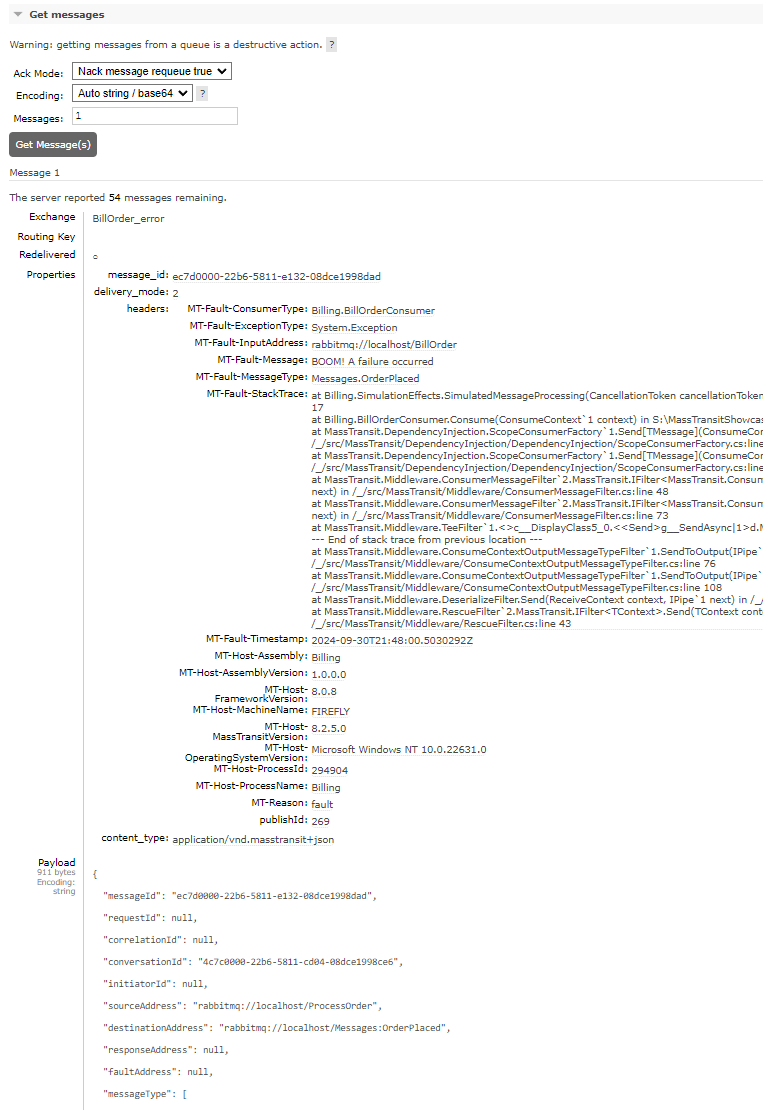
After inspection, all messsages currently stored in the error queue can be ‘shoveled’ back the the original queue.

Delayed messaging on RabbitMQ
Section titled “Delayed messaging on RabbitMQ”Delayed delivery support on RabbitMQ is currently in transition, and our guidance depends on which RabbitMQ distribution you use.
Current Recommendation (Open-Source RabbitMQ)
Section titled “Current Recommendation (Open-Source RabbitMQ)”If you are using open-source RabbitMQ today and need delayed delivery, continue using the RabbitMQ delayed message exchange plugin:
- Plugin repository: https://github.com/rabbitmq/rabbitmq-delayed-message-exchange
- RabbitMQ plugins guide: https://www.rabbitmq.com/docs/plugins
This remains the most practical option for many existing OSS deployments while we finish native alternatives in MassTransit.
What We Are Building Next
Section titled “What We Are Building Next”We are actively working on two paths:
-
Support for delayed queues in Tanzu RabbitMQ Tanzu delayed queues docs: https://techdocs.broadcom.com/us/en/vmware-tanzu/data-solutions/tanzu-rabbitmq-ova/4-2/tanzu-rabbitmq-ova-virtual-machine/site-delayed-queues.html
-
A TTL + DLX-based delayed delivery option for open-source RabbitMQ— Shipped! Queue-based delayed redelivery (UseQueueBasedDelayedRedelivery) is now available. It uses native message TTL and dead-letter exchanges, so no plugins are needed. See Queue-Based Delayed Redelivery (RabbitMQ) for configuration details and how it works. Message TTL docs: https://www.rabbitmq.com/docs/ttl Dead-letter exchange docs: https://www.rabbitmq.com/docs/dlx
As Tanzu delayed queue support becomes available, we will publish migration guidance and recommended topology patterns.
Notes on Scope and Use Cases
Section titled “Notes on Scope and Use Cases”The delayed exchange plugin is typically best for short-to-medium delay windows (for example, retries and delayed redelivery over seconds/minutes/hours).
For long-term scheduling requirements (days or longer), consider external scheduling/data-store approaches.
If you are planning a net-new large-scale delayed scheduling architecture, monitor upcoming MassTransit v9 delayed delivery guidance before committing to a long-lived topology.
Fortunately, delayed redelivery is a core feature of MassTransit, and whichever apporach you choose the transition should be seamless to your consumers, saga state machines, etc. (configuration changes only).